Home Builder

Previous Topic Next Topic
 
classic Classic list List threaded Threaded
21 messages Options
12
Reply | Threaded
Open this post in threaded view
|

Home Builder

özgür
Administrator
Windows 64
PyClone is a custom build of Blender 2.91

Introducing Home Builder for Blender


 Architectural Modeling Tool

0:00 - Introduction
0:28 - Intro to Home Builder Blender Add-On
1:07 - Home Builder for Blender Download Location
1:36 - PyClone Introduction
1:45 - Installation Instructions
2:09 - Adding the PyClone Workspace
2:30 - Enabling PyClone Asset Management
2:44 - Enabling the Home Builder Asset Libraries
3:00 - Saving Preferences and Defaults
3:40 - Intro to Asset Libraries
4:05 - Adding Walls to Our Model
4:35 - Adding Appliances
5:00 - Fixing Errors by Running as Administrator
5:30 - Adding and Adjusting Cabinets
5:50 - Adjusting Library Settings
6:45 - Adjusting Cabinets AFTER They've Been Placed
7:00 - Cabinet Settings
7:15 - Adding Sinks and Faucets
8:21 - Adding Floor and Adjusting Material/Texture
9:15 - Adding Doors
9:50 - Door Settings
11:04 - Adding Windows


Download Link: https://creativedesigner3d.com/2020/11/12/home-builder-asset-library/

About PyClone: https://creativedesigner3d.com/pyclone/

Reply | Threaded
Open this post in threaded view
|

Re: Home Builder

özgür
Administrator
Framed Walls, Brick Walls, and more in Blender with Home Builder

0:00 - Introduction
0:36 - Downloading/Installing Home Builder and PyClone
1:10 - Finding the PyClone Tab
1:35 - Inserting a Wall from the Library
2:05 - Placing Walls
2:57 - Adjusting Walls with Wall Prompts
4:29 - Placing and Adjusting Framed Walls
5:04 - Adjusting framing spacing, heights, etc
5:50 - Adding Brick Walls
6:24 - Fixing Material Error by Running as Administrator
7:18 - Changing Materials in Home Builder
7:40 - Applying New Materials in Home Builder
8:36 - Adjusting wall defaults (heights, etc) in Home Builder
Reply | Threaded
Open this post in threaded view
|

Re: Home Builder

özgür
Administrator
In reply to this post by özgür
New Release! PyClone 2.92
Reply | Threaded
Open this post in threaded view
|

Re: Home Builder

özgür
Administrator
This post was updated on .
Printable 2D Plans
Pyclone, version 2.92


3D Floor Plan from CAD file (under 10 Minutes) with Assets Browser Blender 3.0


free 3d models from https://archive3d.net

0:00 - Intro
0:20 - What we are making
1:02 - CAD Import
1:23 - Wall Modeling
2:48 - Doors & windows
4:27 - Free Models?
5:29 - Furniture
6:11 - Important trick
7:40 - Replace Materiel
8:50 - Done
9:27 - SketchUp Style

Reply | Threaded
Open this post in threaded view
|

Re: Home Builder

özgür
Administrator
In reply to this post by özgür
PyClone is a custom build of Blender 2.93

Here is the link to the download of PyClone and Home Builder -
https://creativedesigner3d.com/pyclone/

Reply | Threaded
Open this post in threaded view
|

Re: Home Builder

özgür
Administrator
Easy Kitchen Design
This video shows you how to design a kitchen using the Home Builder Library for Blender.


Reply | Threaded
Open this post in threaded view
|

Re: Home Builder

özgür
Administrator
Easy Closet Design Tutorial
Reply | Threaded
Open this post in threaded view
|

Re: Home Builder

özgür
Administrator
In reply to this post by özgür
Home Builder 2.93.1 Mutfak


HomeBuilder 2.93 Mutfak tasarımı
Reply | Threaded
Open this post in threaded view
|

Re: Home Builder

özgür
Administrator
HomeBuilder 2.93 Elbise dolabı tasarımı
Reply | Threaded
Open this post in threaded view
|

Re: Home Builder

özgür
Administrator
HomeBuilder 2.93 Dolap kapağı tasarımı
Reply | Threaded
Open this post in threaded view
|

Re: Home Builder

özgür
Administrator
Home Builder 3


Download Link

HomeBuilder 3 Released!

0:00 - Introduction
0:13 - Where to find HomeBuilder 3
2:04 - How to enable HomeBuilder
2:36 - Adding and adjusting walls
5:34 - Adding and editing doors and windows
7:40 - Adding and editing cabinets
10:16  - Adding Appliances
10:58 - Adjusting cabinet style
11:11 - Creating custom cabinets and storage
12:21 - Applying materials
13:22 - Other architectural Add-Ons for Blender!
Reply | Threaded
Open this post in threaded view
|

Re: Home Builder

özgür
Administrator
HomeBuilder to quickly import a reference image in Blender, set it to scale, and create walls and door openings for your floor plans!


Home Builder 3

Reply | Threaded
Open this post in threaded view
|

Re: Home Builder

özgür
Administrator
Reply | Threaded
Open this post in threaded view
|

Re: Home Builder

özgür
Administrator
Home Builder Update
Home Builder 4
Reply | Threaded
Open this post in threaded view
|

Re: Home Builder

özgür
Administrator
Blender 4 Home Builder 4 BETA Tanıtım
Reply | Threaded
Open this post in threaded view
|

Re: Home Builder

özgür
Administrator
Blender ile modelleme,
Unreal ile lumen renderleme [Turkish]
Reply | Threaded
Open this post in threaded view
|

Re: Home Builder

özgür
Administrator
Reply | Threaded
Open this post in threaded view
|

Re: Home Builder

özgür
Administrator
Reply | Threaded
Open this post in threaded view
|

Re: Home Builder

özgür
Administrator
Modeling a 3D windows
Reply | Threaded
Open this post in threaded view
|

Re: Home Builder

özgür
Administrator
This post was updated on .
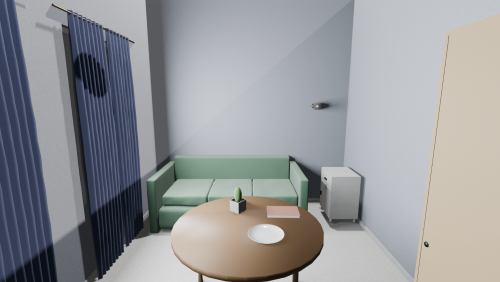
A Blender 4.0 add-on that procedurally generates interior rooms: geometry, furniture, decor, and materials.


Procedural Room Generation

Features
Rectangular room with customizable dimensions (width, length, height)
Window frames (configurable: divisions, crossbar height)
Procedural materials for floors (parquet, tile, laminate), walls (plaster, paint, wallpaper), doors, baseboards — optionally bakeable to .blend
Furniture: tables (8 types), chairs (6 types), beds & sofas (6 types), wardrobes, nightstands, dressers
Decor: kitchenware, lamps, clocks, shelves, paintings, photo frames, rugs, cushions, curtains, mirrors, books, plants, candles, plush toys
Procedural mode — generates furniture and decor on-the-fly (no pre-built .blend files needed)
Chairs automatically placed around tables
Curtains on windows, rugs on floor, cushions & plush toys on beds, books on shelves — all automatic
Paintings, photo frames, and rugs use procedural patterns by default; optionally drop your own images into assets/pool/pictures/, assets/pool/photoframes/, or assets/pool/rugs/
Collision-aware placement respecting room boundaries and existing objects
Room size presets: Small / Medium / Large / XLarge for Randomize
Density and Seed parameters for controlling fill level and reproducibility
Visibility toggles for ceiling and each wall

Usage
Open the sidebar (N) in 3D Viewport
Switch to the Roomicon tab
Configure parameters (collapsible sections):
  Room Size — preset (Small/Medium/Large/XLarge), width, length, height, area
  Visibility — show/hide ceiling
  Walls — wall type (None / Door / Windows), window count, visibility (eye icon)
  Door ▸ — door width and height (collapsed by default)
  Windows ▸ — width, height, sill height, divisions, crossbar (collapsed by default)
  Generation — density and seed
Click Generate Room
Randomize — random parameters from the size preset + generate
Clear Room — remove everything generated

What's New
Rendering Styles
Roomicon now supports two distinct rendering styles, switchable from the UI:

Realistic — EEVEE with AO, SSR, Filmic Medium Contrast, soft 2048px shadows. Warm sun + area fill light,
window area lights (200W budget distributed across windows), cool-blue world ambient.
Anime — EEVEE + Freestyle outlines (1.5px). Materials converted to cel-shading (Diffuse → Shader to RGB →
ColorRamp → Emission) with ×1.4 saturation boost. Two shadowless Suns (3W main + 1.5W fill), shadowless window
lights (40W per window).

v1.1.0

12